

Run your licensing from the terminal.
Apps, licenses, customers, payments, usage — all of it is a command. So what you do twice can run on a schedule, or be handed to the coding agent you already have open.
$ brew tap keylight-dev/tap
$ brew trust keylight-dev/tap
$ brew install keylight
$ keylight login
✓ Signed in as acme-software.
Built for agents, not just people
Claude Code, Cursor, or anything that runs a shell drives the whole thing — the goal, not a side effect. Here's one resolving a support case, start to finish:
Support example. Developer: “jordan@rios.dev emailed — their license stopped
activating on a new Mac.” Claude Code runs keylight customers get
jordan@rios.dev (Pro, 1 license, KEYL-7F3A) and keylight licenses
get KEYL-7F3A (active, 3 of 3 seats used), explains the seats are full,
then on request runs keylight licenses deactivate-device KEYL-7F3A
--instance-id 9f3c1a… to free the oldest device.
Automation example. Developer asks for a nightly license backup and a weekly
active-device post to Slack. Claude Code uses read-only commands — keylight
licenses list --json and keylight usage --days 30 --json —
and wires them into cron jobs that run unattended, since neither is gated.
Setup example. Developer asks to set up a new app, Lumina. Claude Code runs
keylight products create, keylight products key-types
create and update --activation-limit 5, keylight
products free-tier set lumina --enabled, and keylight integrations
connect stripe, then keylight sdk-key get — a gated command
that pauses for the developer to approve in the browser before the SDK key is
revealed.
No command asks a question
Every input is a flag. Nothing waits for you to type, so nothing gets stuck at 3am.
The token lives in an environment variable
A token in KEYLIGHT_API_TOKEN never becomes a command argument, so it stays out of your shell history.
Every command also takes --json. Exit code 2 means one thing only — not signed in — the single failure an agent can fix on its own.
Two ways to run it
Same commands either way. The only difference is whether you are there.
Ask your agent
Say what you want in plain English. Your coding agent works out the commands and runs them.
Automatically
A scheduled job. Nobody has to be watching.
Send someone a beta key
Your agent mints a key on your beta type and attaches the tester's email, so it lands in their portal like any purchase.
Catch refunded licenses
Lists active keys to check against your provider, catching ones behind a refund your webhook missed. Revoking is one approval away.
Look up a customer
Paste an email from a support ticket and get every license they own, which devices are active, and what has expired.
Snapshot your licenses
Writes your whole license list to JSON in storage you control — a copy that never depends on us.
Issue keys for a launch
Hand over a list of addresses and get a key each, on whichever key type you name.
Report on usage
Activations, validations, active and monthly-active devices, pulled on a schedule into your dashboards.
The full command set
Every operation the management API exposes is reachable from a command. A test fails the build if that ever stops being true.
Apps and key types
keylight products
Make an app, set where people buy it, define your key types, turn on the free tier.
Licenses
keylight licenses
List, search, create, and revoke keys. List output stays masked, so a shared screen never leaks one.
Customers
keylight customers
Start from an email and see everything a customer owns.
Payments
keylight integrations
See what is connected, check which price maps to which key, replace a secret.
Usage
keylight usage
Activations, checks, active devices, monthly actives — the dashboard numbers.
Keys and webhooks
keylight sdk-key / webhook
Read or replace the SDK key your app ships with, and point your webhook where you want it.
What still needs your approval
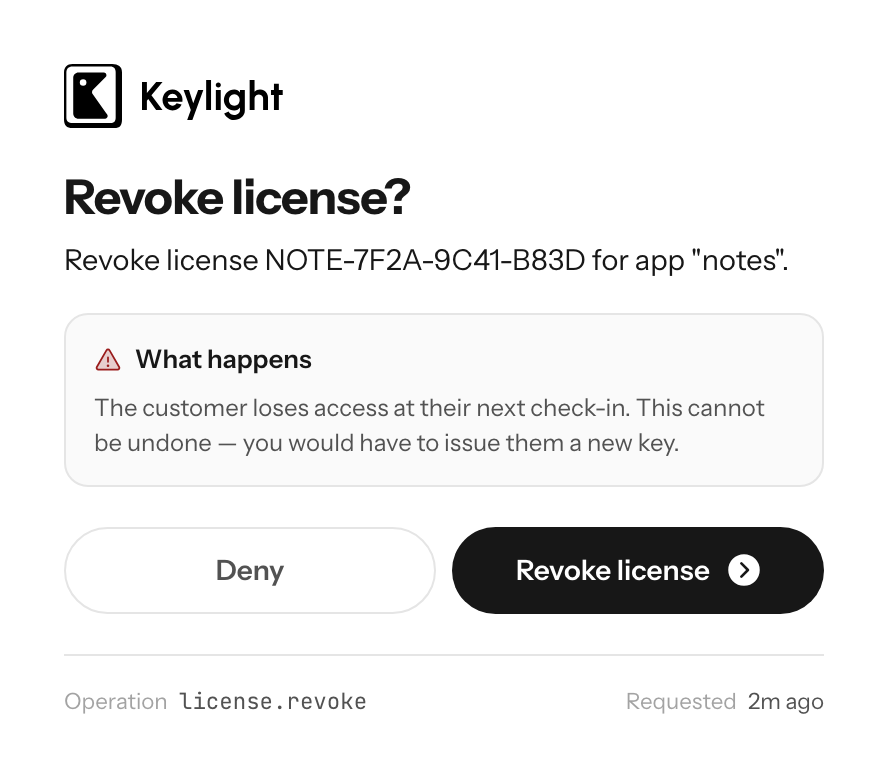
Seven operations will not run on a token alone: revoking a license, exporting licenses, deleting a key type, rotating a payment secret, reading the SDK key, rotating the SDK key, and setting the webhook.
The command stops, shows a link, and waits while you approve that one action in your browser. An agent hands you the link — it cannot click it for you, which is the whole idea. Steal the token and you still cannot revoke a customer's license.
Install it
Homebrew on macOS and Linux — a ready-made binary, no Rust needed. Open source under Apache-2.0, so you can build it yourself instead.
Homebrew
brew tap keylight-dev/tap brew trust keylight-dev/tap brew install keylight Cargo
cargo install keylight-cli
Or grab a prebuilt binary for macOS, Linux, or Windows from the releases page. Then keylight login, approve it in your browser, and you are in. Full setup in the CLI docs.
Frequently asked
Do I need Rust installed to use it?+
No. Homebrew installs a prebuilt binary — no toolchain, and nothing to clear past Gatekeeper. If you do have Rust, cargo install keylight-cli works too, and every release publishes plain binaries for macOS, Linux, and Windows.
Why do I have to run brew trust?+
Since Homebrew 6, a formula from any third-party tap will not load until you trust it — the step is not specific to Keylight. It is a good control: a tap is Ruby that runs on your machine, so read the formula first. It is 60 lines and downloads a published release binary.
Can my coding agent actually run this?+
Yes, and that is what it was built for. No command opens a prompt — every input is a flag. Your token comes from the KEYLIGHT_API_TOKEN environment variable, so nothing secret lands in your shell history. Every command takes --json, and exit code 2 means specifically "not signed in", which is the one failure an agent can resolve on its own.
Is there anything it will not do without me?+
Seven operations need your approval: revoking a license, exporting licenses, deleting a key type, rotating a payment secret, reading or rotating the SDK key, and setting the webhook. A token alone cannot run them — you approve that specific call in your browser. An agent shows you the link and waits.
I run several apps. Can I script across them?+
Yes. Every command takes the app as a flag and speaks --json, so a loop over your products is a few lines of shell — bulk key-type changes, one usage report across a portfolio, a nightly snapshot of every license as JSON.
Is it open source?+
Yes, Apache-2.0, at github.com/keylight-dev/keylight-cli. Every operation the management API exposes is reachable from a command, and a test in that repo fails the build if that stops being true.
 A growing developer community
  Apps shipping with Keylight
  Licenses validated daily
 Ready to ship?
Create your account and start licensing your apps in under a minute. Free forever tier included.
Start Free